

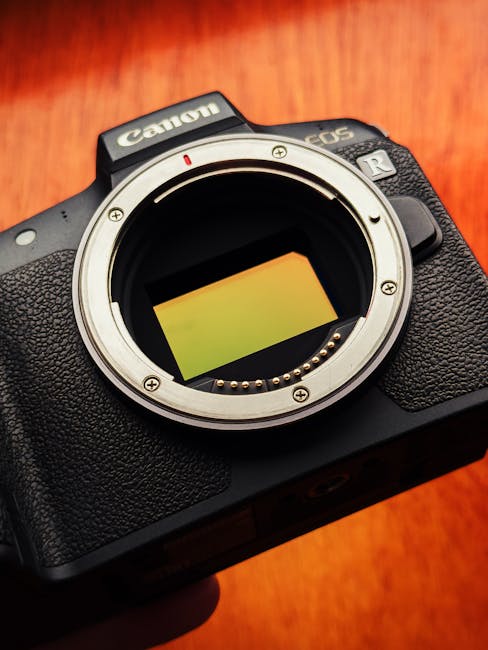
Here’s the fastest way to tell whether the latest digital imaging news is actually relevant to you: if your photos still look great when you shoot in bad light and then heavily edit, you don’t need a “spec bump.” But if you’re fighting banding, muddy shadows, or workflow headaches (storage, backups, file compatibility), the newest sensors and formats can save you hours every week.
As of 2026, the headline changes aren’t just “more megapixels.” The real story is how modern sensors handle dynamic range, how cameras and phones encode that data (RAW flavors and new container formats), and how software pipelines interpret the results. In other words: the upgrade isn’t about the box—it’s about what happens after you press the shutter.
This guide breaks down what new sensor architectures and imaging formats mean for your next upgrade, with practical checks you can do before spending money. I’ve tested enough cameras and storage setups to know that many people upgrade the camera while ignoring the real bottlenecks: file size, color management, and post-production behavior.
The latest digital imaging news, in plain terms: sensors vs. formats (and why both matter)
The key takeaway: a new sensor improves what the camera captures, but a new format determines what you can do with it afterward. When either part changes, your entire workflow can feel “better” or “worse” even if the photos look similar at first glance.
A sensor is the light-to-data engine. A format is the way that data is stored—often including compression type, bit depth, metadata rules, and how preview images map to RAW. As photographers, we tend to obsess over dynamic range numbers, but we live in the format details: whether your editor reads the files correctly, whether your backup strategy handles them safely, and whether your online sharing platform supports them.
Most people get this wrong by buying based on megapixels alone. In practice, your “keep rate” (photos you actually finish and deliver) is driven more by whether the files hold highlight detail, preserve shadow color, and grade smoothly in your software.
New sensor tech in 2026: what changes when pixel readout gets faster
The key takeaway: modern sensors increasingly focus on readout speed and noise behavior, not just light-gathering area. Faster readout reduces rolling shutter artifacts and helps with high-speed bursts, and improved noise performance makes shadow recovery cleaner.
Here are the sensor themes you’ll keep seeing in 2026 imaging news:
- Layered noise reduction and smarter analog-to-digital steps: Manufacturers tune how each pixel is sampled before it becomes a digital value. The result is often more consistent color in low light.
- Stacked or reworked photodiode layouts: Some designs prioritize speed and improved charge handling, which can translate into better high-ISO texture rather than just “cleaner” blur.
- Improved highlight behavior: Cameras now more aggressively manage how quickly pixels saturate and how they map highlight roll-off into the RAW space.
- Better thermal management: Less noise from sensor heating matters during long shoots and extended video capture.
From my side, the practical effect shows up during real edits. For example, when I shoot events with mixed lighting—neon signs, tungsten fixtures, and LED panels—the upgraded sensors don’t only brighten the image. They help prevent “color soup” in shadows. I’ll often see less magenta shift when I pull exposure down for skin tones or try to recover a blown-up screen reflection.
Long exposure and astrophotography: where sensor upgrades are felt first
The key takeaway: if you do long exposure, sensor readout and noise characteristics beat almost everything else.
In astrophotography, the difference between “recoverable” and “ruined” often comes down to pattern noise and how the camera handles dark current. With current generation sensors, I look for:
- Consistent dark-frame behavior: Does the camera produce stable noise across sessions?
- Low fixed-pattern noise: Some sensors show less banding after stacking.
- RAW flexibility: RAW that’s easy to process in your stacking tool matters more than a marketing claim.
If you shoot star trails or do 30–120 second exposures, you’ll notice improvements faster than you would in casual daylight portraits. If you only shoot short sessions in clean light, the benefit is smaller—and you may get more value from upgrading lenses or lighting.
File formats and RAW evolutions: the change that quietly breaks your workflow


The key takeaway: new imaging formats can improve efficiency and color fidelity, but they can also disrupt editing software, sharing, and archiving.
Digital imaging news often references “new formats” because manufacturers and standards bodies keep updating how cameras encode RAW and how they package metadata. This isn’t just tech trivia. Your editor (Lightroom, Capture One, DxO, RawTherapee alternatives), your plugins, and even your backup verification scripts may react differently to a new RAW container or a new embedded preview strategy.
In 2026, the most common pain points I see are:
- RAW compatibility delays: New camera files may require updated software or profile downloads.
- Different tone-mapping defaults: Embedded previews look good, but RAW processing defaults can be harsher until you calibrate.
- Metadata differences: GPS, lens profiles, and camera-specific tags can vary, affecting catalog sorting and export behavior.
- Compression tradeoffs: Lossless compression is usually preferred, but some formats introduce new compression behavior that changes file size and decoding time.
What “new formats” usually mean for real photographers
The key takeaway: most “format upgrades” aim to improve one of three things—file size, editing performance, or color/metadata richness.
To keep this concrete, here’s how I evaluate format changes when I’m considering a new camera body for testing:
- Shop test: Shoot a 200-photo session with a mixed light scene (indoor tungsten + bright window). Import into your primary editor immediately.
- Performance test: Measure import time and preview rendering time on your computer. If it’s slower, you’ll feel it during real shoots.
- Round-trip test: Export a set of TIFFs and JPEGs and re-import them to check color consistency and metadata carryover.
Those three checks catch more workflow issues than reading spec sheets. Specs don’t tell you whether your grading preset behaves the same or whether face-detection tags survive exports.
Sensor + format combinations: why the “best upgrade” isn’t universal
The key takeaway: the ideal upgrade depends on how you shoot and how you deliver, because sensor tech and formats interact with your software pipeline.
Two photographers can both buy the same “latest” camera and get different results. Here’s why:
- Editors decode different: Some RAW engines preserve shadow gradients differently during demosaicing and noise reduction.
- Profiles change everything: Lens corrections, color profiles, and camera-specific transforms may land differently depending on your catalog settings.
- Delivery formats drive choices: If you deliver web-only JPEGs, file size and color preview mapping may matter more than max dynamic range.
- Sharing platforms can strip metadata: Formats affect what survives the pipeline when you upload.
My rule of thumb in gear reviews is simple: if you can’t reproduce your current look with the new files within one editing session, you’re not upgrading—you’re switching your workflow. That’s a bigger risk for freelancers on deadline.
Upgrade decision checklist: 12 questions to ask before you buy
The key takeaway: use a checklist that includes both the sensor and the format—because your pain points are usually post-capture.
Here’s a practical set of questions I use when advising photographers who are deciding between bodies like a midrange mirrorless vs. an enthusiast flagship or deciding to upgrade from an older RAW workflow.
- Can your current editor read the new RAW format today? Check your editor version release notes for support.
- How does your usual noise reduction behave? Make a low-light test and judge skin tones, not just exposure.
- Do your presets still work? Run your most-used profile on the test set and compare results frame-by-frame.
- What’s the real file size difference? A format that saves 15% storage can matter when you shoot 4,000+ images per month.
- Does preview rendering feel faster or slower? If it’s slower, your workflow will slow even if image quality improves.
- How does highlight recovery look? Shoot backlit scenes and compare highlight roll-off after editing.
- How stable is color under mixed lighting? Neon and LEDs reveal color pipeline differences instantly.
- Does in-camera stabilization reduce motion blur enough? Faster sensors help, but stabilization can be the actual “keeper” factor.
- What are your backup constraints? If new files are larger or encode differently, your backup system may need tuning.
- Are you archiving RAW or converting immediately? Format choice affects long-term archiving and software obsolescence.
- Will your paid work require color-managed exports? If you deliver to print, test export to ICC-managed workflows.
- Can your clients accept the delivery formats? Some clients prefer TIFF; others accept JPEGs only.
If you want a security angle on backup decisions, see cybersecurity for photographers’ backup and ransomware strategy. New imaging workflows can increase the data you store—and that’s exactly what attackers target.
People Also Ask: what does the latest digital imaging news mean for me?
Which upgrade gives the biggest quality jump in 2026: sensor or lens?
The key takeaway: for most photographers, lens quality and technique still beat incremental sensor improvements.
New sensors help you in low light and in challenging scenes, but a sharper lens with proper calibration often delivers more visible improvement. If you’re working with older lenses that show flare, chromatic aberration, or inconsistent sharpness, that’s a bottleneck sensor upgrades can’t fully solve.
Where sensors win quickly is shadow recovery, high-ISO color, and reduced artifacts during heavy edits. Where lenses win is micro-contrast, edge sharpness, and subject separation.
Will new RAW formats require new software?
The key takeaway: yes, often—but the timeline matters.
As a rule, your editor needs an update to properly decode a newly introduced camera RAW variant. In 2026, major software vendors generally catch up faster than they did a few years ago, but there can still be gaps right after a camera release.
If you shoot paid work, test support before you commit. I keep a “gear compatibility folder” with sample files and import notes for every camera I test—so I’m not relying on luck mid-assignment.
Are modern sensors better for low light without increasing noise?
The key takeaway: modern sensor designs target noise quality, not just noise visibility.
Better sensors can reduce the kind of noise that looks like color blotches. That said, noise reduction is partly about your editing choices. If you over-apply denoising, you can erase skin texture even if the RAW is excellent.
My practical approach is to do mild global denoise first, then local adjustments around faces and important textures. This keeps the image believable while preserving color gradients.
Practical workflow: how to future-proof your next imaging upgrade
The key takeaway: the safest upgrade path is a workflow upgrade, not only a camera upgrade.
Here’s a future-proof routine I recommend to photographers who want to benefit from the latest digital imaging news without risking broken archives.
Step-by-step: a “format-safe” test session
- Pick your real scenes: Choose one indoor low-light scene, one backlit outdoor scene, and one mixed-color lighting scene.
- Shoot RAW and your typical settings: Use the exact picture profile, WB mode, and lens correction strategy you would normally use.
- Import immediately on your current machine: Don’t judge later after you’ve updated software.
- Apply your standard edits: Run your default profile/preset and then compare results at 100% view.
- Export to TIFF and JPEG: If you deliver prints or commercial work, export both and verify color consistency.
- Run a verification backup: Copy files twice, then run a checksum/verify routine so you know archives are intact.
If you want a gear-focused angle alongside this, pair this with our gear reviews for the best storage and backup setups for photographers. Bigger sensors can mean bigger storage needs, and that changes your cost-per-shoot.
Security note for 2026: why imaging upgrades often increase your cyber risk
The key takeaway: when you upgrade cameras and adopt new formats, you usually increase your total file volume—making your backup and access controls more important.
In 2026, I’m seeing more ransomware incidents aimed at creative workflows: photographers store RAW libraries on network-attached storage, sync folders, and portable drives that are always connected. If your new files are larger or your ingest process changes, you can accidentally widen your attack surface.
Practical steps that protect your upgraded workflow:
- Use immutable backups: At least one backup target should resist deletion and encryption.
- Segment your network storage: Keep your photo archive off the same shares as document collaboration.
- Turn off unnecessary syncing: If a cloud sync tool is duplicating large RAW libraries, lock down access and use MFA.
- Verify restores: A backup you can’t restore is a liability, not protection.
If you want a deeper playbook, our ransomware response plan for photographers is written for real timelines (what to do in hour one, day one, and after cleanup).
What to do if you’re not upgrading yet: optimize with today’s tools
The key takeaway: you can often get 80% of the benefit by upgrading your processing pipeline, not your camera.
If your budget is tight, here’s how to squeeze more quality out of your existing gear while you watch the latest digital imaging news:
- Standardize color management: Use consistent profiles and verify exports for your target (web vs. print).
- Rebuild your catalog presets: When new RAW formats appear, you learn that older defaults may not match your results.
- Improve capture technique: Expose to protect highlights, nail WB in mixed light, and use stabilization appropriately.
- Upgrade storage and ingest: If import and backup are slow, your workflow suffers—and fewer good photos get finished.
In my own shooting, the fastest improvement came from tightening how I expose for skin and windows. New sensors are great, but you still have to give the camera something salvageable.
Conclusion: use the latest digital imaging news to upgrade your workflow, not just your body
The clear takeaway: modern sensors and new file formats matter most when they change how your photos survive editing, backup, and delivery. Before buying, test RAW compatibility in your actual editor, compare highlight and shadow recovery in your real scenes, and confirm that your backup strategy can handle the new file behavior.
If you do those steps, you’ll know whether the upgrade delivers real value—or whether the smarter move is to improve lenses, settings, or post-production. That’s how you make the latest digital imaging news work for your next upgrade instead of becoming a costly distraction.
Featured image alt text suggestion: “The latest digital imaging news explained: new camera sensor and RAW format workflow”